Crosswind Calculator
LiveRunway wind, gusts & limits
On the App Store as “Crosswind Calculator: METAR”

See it run.
About twenty-five seconds of Crosswind Calculator doing its job, recorded straight off the phone. No captions, no voice-over, nothing staged — the same clip the App Store shows.
Watch on YouTubeFree web tool
How do you calculate crosswind and headwind components for a runway?
Take the angle between the wind and the runway heading — Δ = wind direction − (runway number × 10°) — then the headwind is wind speed × cos Δ and the crosswind is wind speed × sin Δ. A 300° wind at 20 kt on runway 27 (270°) works out to a 17-kt headwind and a 10-kt crosswind from the right; the sign of sin Δ tells you the side, and a negative headwind is a tailwind. For density altitude, first find pressure altitude (field elevation + (29.92 − altimeter in inHg) × 1,000), then add about 118.8 ft for every °C the outside air runs above the standard-atmosphere temperature at that altitude.
Wind (blowing FROM)
Crosswind (steady)
9 kt
Blowing from the RIGHT
Headwind
16 kt
Component along the runway
Crosswind in the gust
13 kt
Peak from the RIGHT · 8 kt above the steady wind
Best runway into this wind
RWY 30
0 kt crosswind · 18 kt headwind
Crosswind is within 80% of your 15 kt limit.
Wind triangle: headwind = wind × cos Δ, crosswind = wind × sin Δ, where Δ is the wind direction minus the runway heading. Density altitude uses the standard atmosphere (PA = elevation + (29.92 − altimeter) × 1,000; ISA = 15 °C − 1.98 °C per 1,000 ft; DA = PA + 118.8 ft per °C above ISA). Same computed engine as the app.
Training and planning aid only — not for primary flight operations. It computes and compares against limits you set; it never advises. Always verify wind, weather, and aircraft performance with official sources and your aircraft's POH.
Take it with you
The full Crosswind Calculator: METAR app adds a drawn compass rose with the runway strip drawn at its heading, steady-and-gust crosswind graded against your own personal minimums and saved per aircraft, a plain red banner when it is a tailwind, density altitude with the ISA deviation, every runway 01 to 36 ranked for the wind you have, and the live METAR and real runways of any airport you type — all one-tap, and it works offline with a pasted report. A training and planning aid, not for primary flight operations.
Free on the web
The crosswind guide
A free crosswind and headwind calculator for any wind and runway, the formula, a component chart, gusts, METAR wind direction, worked examples and short answers. It runs the same math as the app.
Crosswind calculator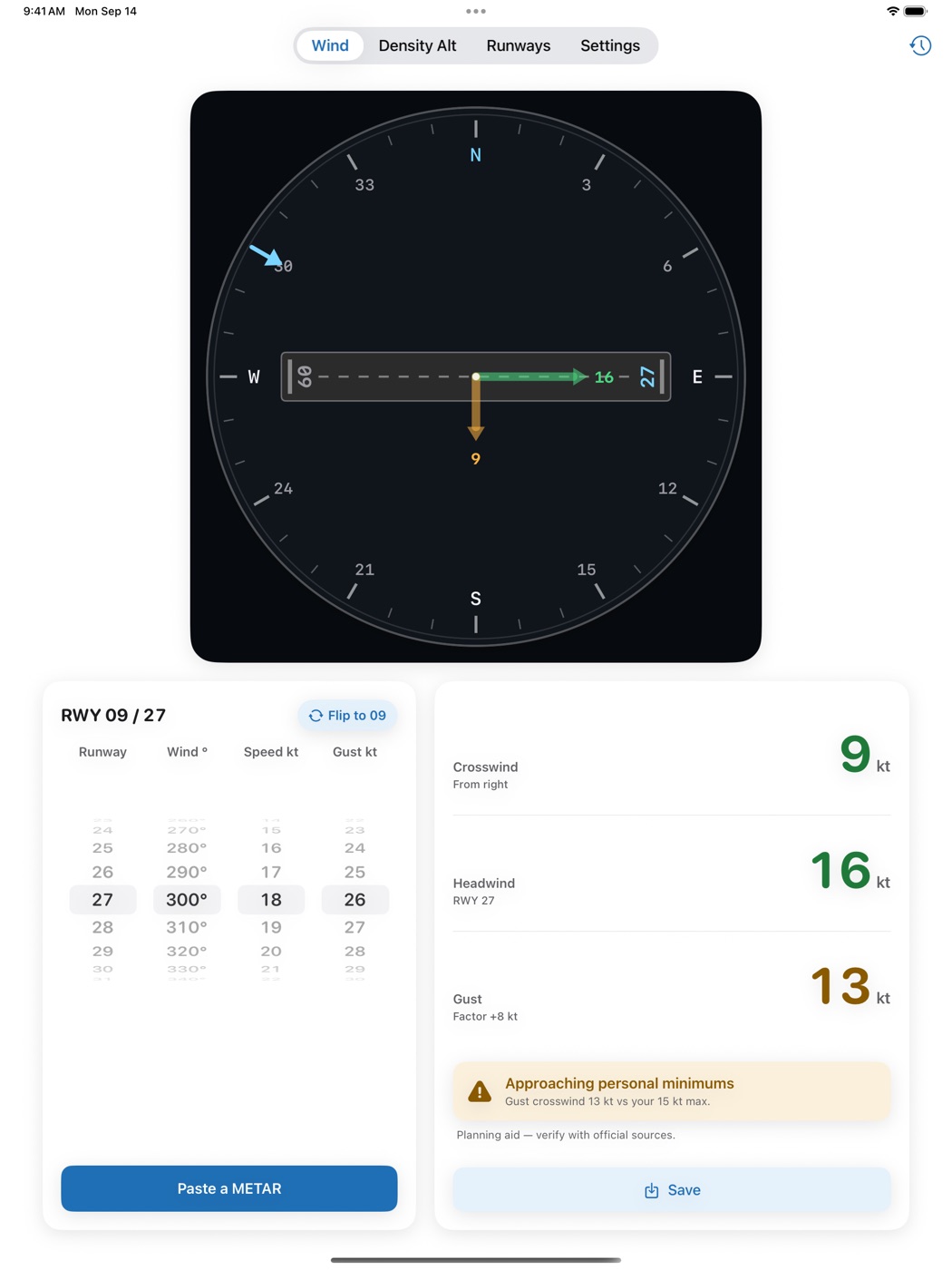
What it is
A preflight calculator for student and general-aviation pilots, in three tabs. Wind: pick the runway, dial the wind, add the gust, and read headwind or tailwind and crosswind in knots, labelled from left or right, for the steady wind and for the gust — on a drawn compass rose with the runway strip drawn at its heading. Density Alt: field elevation, altimeter and temperature give pressure altitude and density altitude with the ISA deviation. Runways: every heading from 01 to 36 ranked by head and crosswind for the wind you have. Paste a METAR, or type the airport for its live report, and the wind, gusts, temperature and altimeter fill in; the Runways tab also lists the real runway ends at that airport, graded and ranked.
Why we built it
A full electronic flight computer buries these everyday answers under fifty other functions, and the single-purpose apps draw nothing. This does exactly the preflight math a pilot runs every flight, grades every result against the pilot's own personal minimums, and draws the picture so the numbers are never a guess. A training and planning aid — not for primary flight operations.
Want one like this?
Crosswind Calculator is one of 18. We can build yours.
Every app on the shelf started as one honest problem, scoped small and built native, end to end. That’s exactly how we approach client work — designed, built and shipped, without the bloat.