Cyanotype
LiveSun prints & digital negatives
On the App Store as “Cyanotype: Blueprint Photo Lab”

See it run.
About twenty-five seconds of Cyanotype doing its job, recorded straight off the phone. No captions, no voice-over, nothing staged — the same clip the App Store shows.
Watch on YouTubeFree web tool
How do you turn a photo into a cyanotype (blueprint blue) print?
A cyanotype is the classic prussian-blue photographic print — the deep blue of an architect's blueprint — and you can give any photo that look with a duotone (two-tone) gradient map. First collapse the image to grayscale so only its light-to-dark tones remain, add a little contrast so the midtones stay dense, then remap every tone onto a blue ramp: the darkest tones become a deep prussian blue, the midtones a saturated cyan-blue, and the brightest tones a warm paper white. Running that ramp through a saturated middle blue — rather than a straight line from navy to white — is what keeps the print reading unmistakably blue instead of a washed-out gray, and a touch of film grain, paper texture, an edge vignette and a flat matte border sell the hand-coated darkroom feel. The tool below does all of it in your browser on a canvas, so nothing is ever uploaded — with the same six presets and Tone/Grain/Wash controls as the app; drop in a photo and download the finished print.
Look
Border
Everything runs in your browser — your photo never leaves this device. The prussian-blue tritone, contrast curve, grain, wash and border are the same engine as the app.
Take it with you
The full Cyanotype: Blueprint Photo Lab app renders the print at full resolution and saves it straight to your Photos or shares it in one tap, shows live preset thumbnails made from your own photo, adds matte borders in three widths, presses and holds to compare with the original, remembers your last edit, and works entirely offline with no browser size limits — one perfect blue film look, done properly.
Free on the web
The cyanotype guide
How to make a cyanotype print, a digital negative preview for contact printing, exposure times with their sources, toning with tea, troubleshooting and short answers. Process and safety facts are quoted from the maker’s instructions and safety data sheets.
How to make a cyanotype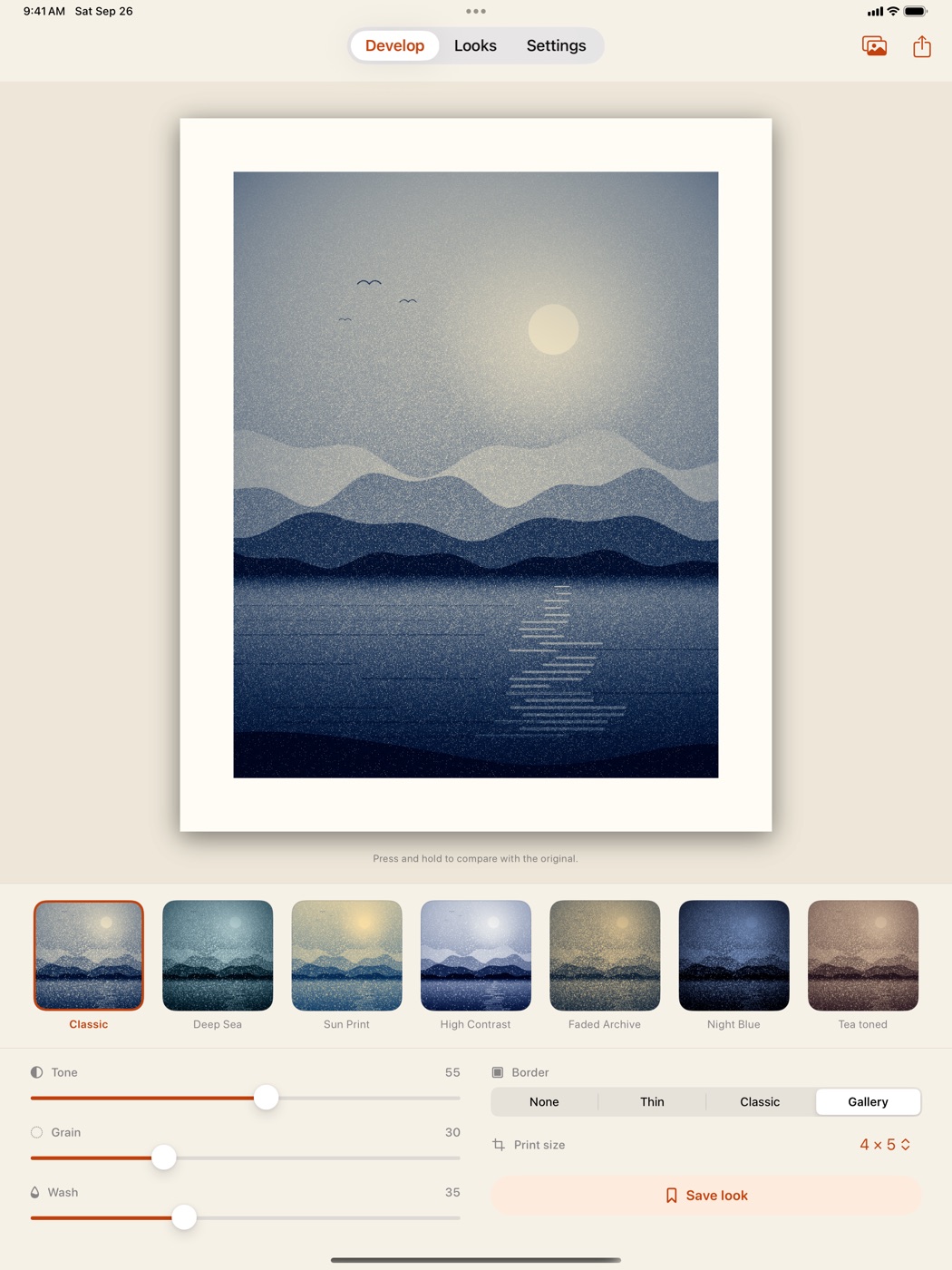
What it is
Cyanotype turns any photo into a deep prussian-blue blueprint print, the sun-printed look of the earliest photographic process. Seven hand-tuned looks plus tone, grain, wash and matte-border controls, all previewed live on your own photo before you export, and the develop: the print comes up from the coated sheet to Prussian blue like the real wash. Then the digital negative — inverted and mirrored at full resolution, in square, 4 × 5, 5 × 7 and 8 × 10 — for contact printing a real cyanotype in the sun.
Why we built it
Cyanotype does one process properly: a real duotone darkroom pipeline, tuned so the first import already looks worth framing — and the digital negative to print it for real. It serves people who want one specific, well-made aesthetic and to own it outright — no account, no subscription, nothing leaves the phone.
Want one like this?
Cyanotype is one of 18. We can build yours.
Every app on the shelf started as one honest problem, scoped small and built native, end to end. That’s exactly how we approach client work — designed, built and shipped, without the bloat.